

Automated invoice processing: How to automate invoices at enterprise scale
|
The invoices that match cost your shared services center almost nothing. The exceptions cost it everything: a price variance against the purchase order, a goods receipt nobody has posted yet, a business-unit approver who still hasn't opened the email. They all land in the same queue, and your team works that queue by hand, one invoice at a time.
According to Ardent Partners (2025), the average AP team spends $9.40 to process an invoice, while best-in-class teams spend $2.78. Cycle time shows the same gap: 9.2 days on average, 3.1 days for the leaders.
Best-in-class teams also run a 9% exception rate against 22% for everyone else. At 50,000 invoices a month, that 13-point difference is roughly 6,500 extra invoices landing on someone's desk.
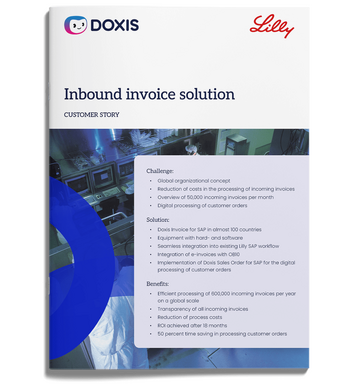
Automated invoice processing closes that gap. Clean invoices post themselves, and your team only sees the ones that need a decision. This guide shows you how to automate invoice processing in SAP step by step, which metrics prove it's working, and what a global rollout looked like at Eli Lilly.
Key takeaways
- Automated invoice processing captures, extracts, matches, approves and posts supplier invoices with little or no manual entry
- In a shared services center, the real workload is the exception queue, so the goal is to shrink exceptions and route them fast
- The three-way match against SAP purchase orders and goods receipts decides which invoices post straight through
- Approvers without an SAP license can review and release invoices in a browser or mobile app, so you don't have to buy SAP seats for every business-unit sign-off
- Touchless rate, exception rate, cost per invoice, cycle time and discount capture tell you whether automation is paying off
What is automated invoice processing?
Automated invoice processing is the use of OCR, AI and workflow software to capture incoming supplier invoices, extract their data, match them against purchase orders and goods receipts, and route them for approval before posting them to your ERP. Invoices that pass every check go straight through to payment without anyone keying in data.
Automated invoice processing vs. e-invoicing
The two terms get mixed up, but they solve different problems. An e-invoice is a format: structured, machine-readable data such as an EDI message or a UBL file. A PDF attached to an email is a digital invoice, but a human or an OCR engine still has to read it.
Automated invoice processing is the workflow that runs after an invoice arrives, whatever its format. Your US suppliers will send you everything from clean EDI feeds to a scanned paper invoice from a small local vendor. An automated process handles all of them in the same flow. Structured e-invoices simply skip the extraction step, which is why e-invoicing in SAP and invoice automation belong in the same project.
Why exceptions, not volume, are the real cost of manual invoice processing
How to automate invoice processing in SAP: step by step
The steps below follow the path an invoice takes from arrival to archive. Each one removes a manual touchpoint, and together they leave your team with only the invoices that need judgment.
Step 1: Centralize invoice receipt across every channel and entity
Start with intake, before you think about extraction. If invoices still arrive at 40 different mailboxes and three scanning stations, no amount of AI downstream will give you control.
Route every channel into one central inbound mail automation process: email, scanned paper, EDI and structured e-invoices, from every business unit and legal entity your center serves. Clean, readable invoices are verified automatically on arrival. From that point on, every invoice has a status, and your team works from one queue.
Step 2: Extract and validate invoice data automatically
Invoice OCR for SAP and AI data extraction read the header data and line items: supplier, invoice number, date, amounts, tax and payment terms. The software then runs plausibility checks for missing mandatory fields, duplicate invoices and values that don't add up.
Fields the engine reads with low confidence are flagged for a person to confirm. That human confirmation matters. Every correction your team makes on a supplier's layout feeds back into the extraction, so recurring suppliers generate fewer exceptions month after month.
Step 3: Run the three-way match against SAP purchase orders and goods receipts
For PO-based invoices, the software compares the invoice with the purchase order and the goods receipt in SAP, the core of 3-way matching in SAP. Price, quantity and value are checked against configurable tolerance keys. Invoices inside tolerance move on without anyone touching them.
Set those tolerances deliberately. Too tight, and you flood your queue with two-cent variances. Too loose, and you pay for price drift nobody approved. For services and subscriptions without a goods receipt, a two-way match against the PO is the right control. Our guide to SAP invoice matching covers when to use each.
Step 4: Route only the exceptions to your team
This is where the shared services workload actually shrinks, and it's the foundation of touchless invoice processing. Any invoice that fails a plausibility check, exceeds tolerance or has low-confidence data is flagged with a structured message that states the reason. It goes to a manual work center or group workbasket, where the rest of the queue keeps moving.
When a deviation needs input from purchasing or the receiving plant, a workflow-based clarification process sends the question to the right person and keeps the answer attached to the invoice. Your team stops chasing replies by email, and the history of every decision stays with the document.
Step 5: Take approvals outside SAP for non-SAP users
Approvals are where shared services centers lose the most time, because the people who need to sign off sit in the business units. A two-tier invoice approval workflow works best. A reviewer confirms the invoice is justified, correctly ordered and delivered. An approver then checks budget and cost assignment and releases it, following approval hierarchies based on the invoice amount.
Enforce the four-eyes principle so nobody can approve their own invoice. This separation of duties is the kind of evidence your auditors will look for when they test internal controls under SOX. Approvers who don't hold an SAP license can review and approve in a browser or mobile approval app outside SAP. You can route sign-offs to the wider organization without provisioning SAP GUI access for every cost center owner.
Step 6: Post straight through, then archive with a link to the SAP document
PO-referenced invoices that pass matching post automatically in SAP. Non-PO invoices post once they've been reviewed and approved, worked from a shared group workbasket in SAP GUI or SAP Fiori, which suits a centralized team. After posting, the software checks payment status, so you can confirm settlement without leaving the process.
Every invoice is then archived via SAP ArchiveLink or CMIS with a link back to the SAP object: the purchase order, the MM document or the FI document. The processing history and audit trail are stored with it. A monitor gives your team a searchable view of the whole queue, which is how you track SLAs across many entities at once.
Benefits of automated invoice processing for shared services centers
Automation pays off in more places than faster data entry. For a center serving several entities, the gains of enterprise AP automation compound as you add volume.
- Lower cost per invoice: clean invoices post without human touch, so your cost falls with every point of touchless rate you gain
- Faster cycle times: invoices move from receipt to posting in days, the fastest way to reduce invoice processing time, which puts early-payment discounts back within reach
- A shrinking exception queue: extraction learns from corrections, so recurring suppliers generate fewer exceptions over time
- Approvals without extra SAP seats: business-unit approvers sign off in a browser or on mobile
- Audit readiness: every invoice carries its approval trail and a link to the SAP document it belongs to
- Scale without headcount: new entities join the same queue and rules, so volume grows faster than your team has to
Benefits of automated invoice processing for shared services centers
For a center serving several entities, every invoice that posts on its own frees capacity for the ones that need judgment.
- Lower cost per invoice: clean invoices post without human touch
- A shrinking exception queue: extraction learns from every correction
- Approvals without extra SAP seats: business-unit approvers sign off in a browser or on mobile
How to measure automated invoice processing: 5 metrics to track
A go-live date proves nothing on its own. Baseline these five metrics before you start, then track them monthly, per entity where you can.
Touchless rate
This is the share of invoices that go from receipt to posting with no human touch, and it's the metric to watch first. According to Ardent Partners (2025), the average is 32.6% and best-in-class teams reach 49.2%. Your ceiling depends on PO coverage and supplier master data quality, which is why purchase order automation pays off here too.
Exception rate
Track the share of invoices that need manual handling, then break it down by reason: price variance, quantity variance, missing goods receipt, missing PO. According to Ardent Partners (2025), top performers run at 9% against an industry average of 22%. The breakdown tells you whether to fix tolerances, purchasing discipline or receiving.
Cost per invoice
Divide your fully loaded AP cost, including labor, software and exception handling, by invoice volume. According to Ardent Partners (2025), the average is $9.40 and best-in-class teams spend $2.78.
Cycle time
Measure the days from invoice receipt to posting, and separately to payment. According to Ardent Partners (2025), the average is 9.2 days, while best-in-class teams take 3.1 days.
Discount capture rate
Track the share of available early-payment discounts you actually take. It's the metric your CFO will care about most, because it turns faster processing into cash and anchors the ROI of an automated invoice solution.
What happens to your invoices after posting
Posting closes the AP task. It doesn't close the invoice's life. That invoice now has to stay retrievable, unaltered and connected to the documents that justify it for years.
The IRS advises keeping records for three years in most cases, and seven years if you claim a loss from bad debt. Your auditors will want more than the invoice itself when they test SOX controls: the PO, the goods receipt, the approval trail and proof of who released the payment. If those pieces live in four different systems, every audit request becomes a small project.
That's why invoice automation works best as one part of your wider document lifecycle. After posting, each invoice needs:
- Audit-proof archiving: stored unaltered for its full retention period, with retention and deletion rules applied automatically
- Retrieval from SAP: with SAP document management, one click from the FI or MM document to the original invoice and its history
- Context: the supplier contract, order confirmation and delivery note that back it up, linked to the same record
- Search: findable by supplier, entity or amount when an auditor, a supplier or your controller asks
Running capture, workflow and archive as separate products is exactly what creates the fragmentation you are trying to escape. The more of that lifecycle one platform covers, the fewer handoffs your team has to reconcile.
Automate invoice processing in SAP with Doxis
Your shared services team shouldn't spend its days chasing variances and approvers by email. Doxis Invoice for SAP captures invoices from every channel, extracts and validates the data with Doxis AI.dp, runs the three-way match against SAP purchase orders and goods receipts, and sends your team only the exceptions. Approvers inside or outside SAP release invoices in a two-tier, four-eyes workflow, and matched PO invoices post automatically. Doxis puts the result at up to 60 to 80% lower invoice processing costs.
Invoice processing is one module of Doxis P2P for SAP, which also covers purchase requisitions, order confirmations and audit-proof archiving. All of it runs on the Doxis Intelligent Content Automation platform, which also handles contract management and long-term records retention.
- Touchless posting: PO-referenced invoices that pass matching post automatically in SAP
- Exception-only workload: your team works a structured exception queue with the reason attached to every invoice
- Approvals without SAP licenses: business-unit approvers sign off in a browser or on mobile
- Audit-ready by default: every invoice is archived via ArchiveLink or CMIS with its full processing and approval history
- One platform for the full P2P cycle: extend from invoices to purchase requisitions, order confirmations, contracts and archiving without adding another vendor
Doxis is a Leader in the Gartner® Magic Quadrant™ for Document Management 2026. In a Forrester Total Economic Impact™ study, SEW-Eurodrive achieved a 336% ROI with Doxis and paid back its investment in under six months. Request a free demo to see how Doxis automates invoice processing in your SAP landscape.
Automate Work. Accelerate Business.
Bring together AI, ECM, and workflow automation in one powerful enterprise platform.
Frequently asked questions for automated invoice processing
What is invoice processing?
Invoice processing is how a business receives, checks, approves, posts and pays supplier invoices. It covers everything from the moment an invoice arrives until it is paid and archived.
What is automated AP invoice processing?
Automated AP invoice processing uses OCR, AI and workflow software to handle supplier invoices in accounts payable with minimal manual entry. Clean invoices are matched and posted automatically, and only exceptions reach your team.
What does automated invoice processing software do?
Automated invoice processing software captures invoices from every channel, extracts and validates their data, matches them against purchase orders and goods receipts, and routes approvals. It then posts approved invoices to your ERP and archives them with a full audit trail.
Can automated invoice processing run as a cloud service?
Yes. The Doxis platform, for example, runs in the cloud, on premises or as a hybrid deployment, so you can choose the model that fits your IT and compliance requirements.
How does automated invoice processing work in SAP?
The software reads each invoice, checks it against the SAP purchase order and goods receipt, and routes exceptions and approvals through a workflow. Matched PO invoices post automatically in SAP, and the archived invoice links back to the SAP document.
How do you choose the best automated invoice processing software?
Look for native ERP integration with SAP, reliable extraction across every format your suppliers send, configurable matching tolerances, approvals for non-SAP users and audit-proof archiving. Ask vendors for enterprise references at your invoice volume.
How long does it take to implement automated invoice processing?
It depends on your number of entities, channels and SAP customizations. Many enterprises start with one entity or invoice type, prove the touchless rate, then roll out in waves.



How can we help you?
+49 (0) 30 498582-0Your message has reached us!
We appreciate your interest and will get back to you shortly.