

In-house vs. outsourcing: how to digitize your inbox the right way
|
A supplier invoice sits in a shared mailbox for three days before anyone notices it. A claims document gets scanned, misfiled, and rescanned a week later when someone finally asks where it went. Somewhere in the building, a person is still walking letters from the post room to the right desk, one at a time.
According to the AIIM and Deep Analysis Market Momentum Index (2025), 61% of enterprise document processes still include paper, and 48% of organizations expect that volume to grow, not shrink. Paper is not disappearing on its own.
A digital inbox fixes the bottleneck by capturing, classifying and routing inbound mail the moment it arrives, regardless of channel. What most guides skip is the decision that shapes everything downstream: should your business scan and process that mail itself, or hand the physical handling to an outsourcing partner? This guide covers both, the three-step setup and the in-house vs. outsourcing call.
Key takeaways
- A digital inbox captures, classifies and routes inbound mail automatically, cutting the manual handling that creates backlogs
- 61% of document processes still include paper, according to the AIIM/Deep Analysis Market Momentum Index 2025
- DEVK reduced the effort of distributing incoming mail by 75% after automating inbound processing with Doxis
- Whether you scan in-house or through an external provider, the integration into your DMS and downstream workflows stays the same
- The right choice between in-house and outsourced scanning comes down to volume, compliance exposure and how fast you need to scale
What is a digital inbox?
A digital inbox is the entry point where all inbound business mail, whether email, digital fax, portal upload or scanned paper, arrives in one place and is automatically classified, extracted and routed to the right person or process. It replaces manual sorting and physical handoffs with an automated capture and distribution step inside your document management system.
The real cost of leaving the scanning decision unmade
How to digitize your inbox: step by step
Step 1: Reduce and standardize your mail channels
Start by cutting the number of channels mail can arrive through. Ask vendors and partners to send documents digitally wherever possible, through email, a shared workspace, or a portal such as Peppol. This gets easier every year: eInvoicing mandates across the EU are pushing suppliers toward electronic formats anyway, so consolidating channels now is working with the trend, not against it.
For customer-submitted documents, a self-service upload app removes the postal step entirely. Insurers use this heavily for claims: a policyholder photographs a receipt or a repair invoice and uploads it directly, which is faster for them and cheaper for you.
Paper will still arrive no matter how many digital channels you open. That is where the in-house vs. outsourcing decision below comes in: you either run bulk scanning yourself, sorting inbound letters by barcode, or hand the physical scanning to an external provider working under a documented, GDPR-compliant process.
Step 2: Classify and extract the data
Once mail is digitized, classification and data extraction run together. OCR turns scanned images and PDFs into machine-readable text, and an AI-powered document management system classifies each item by the keywords it contains. An invoice gets flagged by terms like invoice number, supplier data and VAT number, then filed under the correct document type automatically.
The extraction step pulls the same structured fields out in parallel: invoice number, supplier data, amount, line items, VAT number. AI-driven extraction reads document content directly, which means you are not maintaining brittle field-by-field configuration for every supplier template.
Step 3: Trigger the right workflow
Correctly classified documents land in the matching digital file automatically. An inbound invoice goes straight into the relevant supplier file, the system posts it to the invoice ledger, and it notifies the employee responsible for approval, all at once.
Delegation rules mean an absent processor's inbox does not stall the queue: mail routes to a deputy automatically. AI adds a further layer here, reading document context to suggest which file something belongs in and flagging what needs attention first.
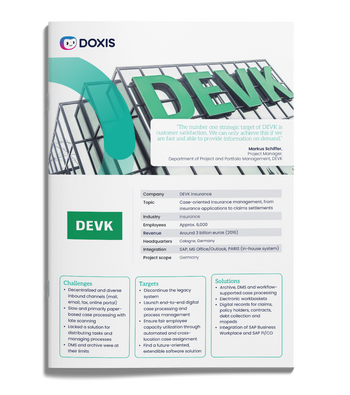
DEVK cuts mail distribution effort by 75% with Doxis
DEVK, one of Germany's largest insurers, automated inbound mail processing with Doxis to get incoming documents to the right desk without the manual sorting step that used to slow claims and policy work down.
"An ECM system can integrate into leading systems such as SAP as a pure archive, and on the other hand it can take on the leading role in other projects, depending on the requirements of the departments," says Markus Schiffer, Project Manager at DEVK.
- Reduced the effort of distributing incoming mail and tasks by 75%
- Processes 32% of claims on the same day they arrive
- Improved claims handling efficiency by up to 10% through automation
In-house vs. outsourcing: how to choose
Neither option is universally right. The decision comes down to three factors.
| Factor | In-house scanning | Outsourced scanning |
| Volume | Works well under a few hundred items a month | Cost and quality-control burden favor outsourcing above that threshold |
| Compliance | Direct control over the handling chain | GDPR terms, data location and audit trail must be explicit in the contract |
| Speed to scale | Limited by how fast you can hire and train | A contract conversation, not a hiring one |
| Staffing risk | Sick days and holiday cover fall on you | Provider carries the staffing buffer |
What stays the same either way
Switching between in-house and outsourced scanning does not change your Doxis integration:
- Paper gets scanned, in-house or through a provider
- It lands through the same input channel
- Classification, extraction and workflow run identically from there
You are not choosing a different software setup, only who handles the physical paper before it reaches your document management system.
Where your digital inbox fits into your wider content strategy
Digitizing inbound mail solves the entry point, but the document's life does not end there:
- It still needs to be filed, versioned and findable months or years later
- It has to be retained for exactly as long as the law requires, and no longer
- It has to surface instantly when an auditor, a customer or a colleague asks for it
Treating inbound mail capture as a standalone project is how businesses end up with a fast front door and a slow, fragmented back office: documents that arrive quickly but sit in disconnected systems once they are filed. The capture step and the archiving, retention and retrieval that follow work best on one platform, not three.
That connection also closes the dark data gap: information that is scanned but never properly classified or linked to its business context is just as inaccessible as paper in a filing cabinet. It is simply digital now.
Doxis makes the digital inbox part of one platform
Doxis handles inbound mail capture, classification and workflow automation as one connected process, whether the paper behind it was scanned in-house or by an external provider. Artificial intelligence classifies documents, extracts structured data and routes each item to the right file and the right person without manual sorting.
That capture step is one part of Doxis Intelligent Content Automation, which brings document management, archiving, contract lifecycle management and process automation together on a single platform. A digital inbox that feeds into a disconnected archive just moves the fragmentation one step downstream, so Doxis keeps capture, storage and retrieval on the same system from day one.
- Automated classification and extraction cuts manual sorting and re-keying
- Documents route to the right file and person the moment they are captured
- Delegation rules prevent processing backlogs during absences
- One platform covers capture through to audit-proof, long-term archiving
- Works the same way whether scanning happens in-house or through a provider
- Deep SAP and Microsoft integration keeps inbound documents connected to the systems your teams already use
Doxis is recognized as a Leader in the Gartner® Magic Quadrant™ for Document Management. If your inbound mail process still runs on manual sorting and inconsistent scanning, book a demo to see how a digital inbox fits into your document strategy.
Automate Work. Accelerate Business.
Bring together AI, ECM, and workflow automation in one powerful enterprise platform.
Frequently asked questions for digital inboxes
What is a digital inbox?
A digital inbox captures inbound business mail from every channel, email, fax, portal or scanned paper, and automatically classifies, extracts and routes it to the right person or workflow.
Should we scan mail in-house or outsource it?
It depends on your volume, compliance requirements and how fast you need to scale. Low volumes usually favor in-house scanning, while high volumes and staffing constraints favor outsourcing to a provider with dedicated equipment and quality control.
Does outsourcing scanning change how the documents are processed in Doxis?
No. Paper gets scanned, in-house or through a provider, and lands through the same input channel into the same classification, extraction and workflow process in Doxis.
Is outsourced document scanning GDPR compliant?
It can be, provided the provider processes documents under a data processing agreement, stores data in a compliant location and documents the handling chain. Confirm these terms explicitly in the contract rather than assuming them.
How does AI improve inbound mail classification?
AI reads the content of a document, not just its layout, to identify document type and extract structured fields such as invoice number or policy number, which removes the need for manual, template-by-template configuration.
What happens to documents after they are digitized?
Classified documents are filed into the relevant digital file, trigger any required workflow such as invoice approval, and move into the archive for the duration of their legal retention period.
Can a digital inbox handle documents from customers directly?
Yes. Self-service upload apps let customers submit documents such as claims paperwork directly, which Doxis then captures and routes the same way as any other inbound channel.
How much manual effort does a digital inbox actually save?
Results vary by document volume and starting process, but DEVK reduced the effort of distributing incoming mail and tasks by 75% after automating inbound processing with Doxis.



How can we help you?
+49 (0) 30 498582-0Your message has reached us!
We appreciate your interest and will get back to you shortly.