

Why an audit trail is a must-have for your enterprise
|

Every system in your company keeps some kind of log. Very few of those logs would convince a regulator. An audit trail is the version that does: a complete record you can hand to an auditor that shows exactly what happened to a document, who did it and why.
Regulators take missing records seriously. According to the US Securities and Exchange Commission (2024), its initiative on off-channel communications has led to charges against more than 100 firms and more than $2 billion in penalties since December 2021. Those cases concerned business messages sent over personal texts and messaging apps that firms failed to preserve. The lesson carries over to every regulated record: if you can't produce it and show how it was handled, you are held responsible.
So what separates a usable audit trail from a pile of log files? Below, you'll find what an audit trail must contain, which US and UK rules require one, how four industries use them day to day, and how to choose audit trail software that holds up under scrutiny.
Key takeaways
- An audit trail is a chronological, tamper-evident record of who did what, when and why in a system or process
- Regulations such as SOX, SEC Rule 17a-4, FDA 21 CFR Part 11, UK GDPR and DORA expect you to prove how records were created, changed and approved
- The strongest audit trails combine automatic capture (user, action, timestamp) with manual notes that explain the reason for a step
- Good audit trail management covers what you record, who can see the log, how long you keep it and how often you review it
- An audit trail is only as complete as the systems it covers: when capture, approval and archiving run on separate systems, the history of a record ends up fragmented
What is an audit trail?
An audit trail is a chronological, tamper-evident record of every action taken on a document, data record or process step, showing who performed each action, what they did, when it happened and, where needed, why, so the process can be reconstructed and proven later.
Audit trails are also called activity feeds, transaction logs or change histories.
Take an invoice as an example. An audit trail logs when it arrived, who checked it, who changed the cost center, who approved it and when it was archived. Each step has a name and a timestamp attached.
What does an audit trail look like?
In a document workflow, each entry in an audit trail answers four questions:
- Who: the user (or automated process) that performed the action
- What: the action itself, such as creating, editing, approving or deleting
- When: the timestamp, with date and time
- Why: the reason for the action, where one was recorded
Automated vs. manual audit trails
Most audit trails mix two kinds of entries. The split matters, because each one covers a gap the other leaves open.
- Automated: the system records data points on its own, for example which user performed which action at what time. Nobody has to remember to log anything
- Manual: users add context the system can't infer, such as a note explaining why an invoice was put on hold and what the result was
Automated entries give you completeness. Manual entries give you the reasoning an auditor will ask about. In a document management system (DMS) like Doxis, the audit trail also records automated tasks carried out by AI in your ECM, such as filing a document or assigning a task based on a rule. Machine-driven steps stay as traceable as human ones.
Benefits of audit trails
Hey Doxi, what are the benefits of an audit trail?
1. Compliance assurance An audit trail is concrete evidence that you followed the rules at every step. When an auditor asks for proof, you produce a report in minutes. Records stay accessible and complete, which shortens audits and reduces follow-up questions.
2. Risk mitigation Audit trails act as an early warning system. Unusual access patterns, out-of-hours changes or approvals that skip a step become visible before they turn into a violation, a fraud case or a data breach.
3. Greater transparency A detailed view of every process step is the backbone of audit-proof procedures. Stakeholders trust numbers they can trace back to the source.
4. Process optimization The same log that satisfies an auditor shows you where work stalls. If invoices wait four days for a second approval every month, the audit trail shows it. That makes it easier to fix weak workflows and standardize the ones that work.
5. Better collaboration When every team member can see who did what on a case, handovers get easier. Nobody has to ask "did someone already check this?"
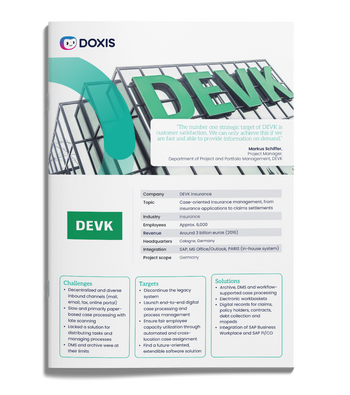
Process-centric insurance management
See how German insurer DEVK made every case traceable across SAP, in-house and host systems, and cut the time spent on mail distribution by 75%.
Read nowLegal requirements for audit trails
Many enterprises are legally required to keep audit trails, and the rules that apply depend on your industry and where you operate. Check three areas first: quality management obligations, audit-proof archiving rules and data protection law. Then look at the sector-specific regulations below. Requirements change, so always confirm the details with your legal or compliance team.
Quality management and ISO standards
Audit trails are central to quality management. Standards such as ISO 9001 expect you to control documented information and show how it was approved and changed. In fields with heavy product liability, such as automotive or medical device manufacturing, every step needs to be documented precisely enough to reconstruct what happened years later.
Audit trails and GDPR
Data protection law cuts both ways for audit trails. An audit trail captures personal data (usernames, timestamps, actions), so it can reveal how individual employees work. In Germany, for example, this kind of monitoring requires the works council to be involved before you switch it on.
At the same time, audit trails protect personal data. They document exactly who accessed customer or employee records and when, which helps you prove GDPR compliance and spot misuse early.
Audit trail requirements in the US
US rules are spread across several regulators, with no single audit trail law. The ones enterprise compliance teams meet most:
- Sarbanes-Oxley Act (SOX): public companies must assess and report on their internal controls over financial reporting. Audit trails are the evidence that those controls actually ran, and SOX makes altering or destroying records to obstruct an investigation a criminal offense
- SEC Rule 17a-4 and FINRA Rule 4511: broker-dealers must preserve required records electronically. Since the SEC's 2022 amendments, firms can meet the rule with a system that keeps a complete, time-stamped audit trail of every modification and deletion
- FDA 21 CFR Part 11: for life sciences, electronic records need secure, computer-generated, time-stamped audit trails that record the creation, modification and deletion of records, without obscuring earlier entries
For a broader view of US retention and integrity rules, see our audit-proof archiving guide for the US.
Audit trail requirements in the UK
UK requirements focus on accountability: you have to be able to show your work.
- UK GDPR and the Data Protection Act 2018: the accountability principle requires you to demonstrate compliance, including who accessed and processed personal data
- FCA record-keeping rules (SYSC 9): regulated financial firms must keep orderly records of their business and internal organization, sufficient for the FCA to check compliance
- UK Corporate Governance Code 2024: from financial years starting on or after January 1, 2026, boards of companies applying the Code must declare whether their material internal controls are effective. This shift is widely known as UK SOX, and audit trails are a key part of the evidence behind that declaration
EU financial services: DORA and Solvency II
If you operate in the EU financial sector, two more frameworks apply. The Digital Operational Resilience Act (DORA) has applied to banks, insurers and their ICT providers since January 17, 2025, and its ICT risk management rules include logging and monitoring requirements. Solvency II requires insurers to run an effective system of governance with documented policies and decisions, which audit trails help evidence.
Audit trail examples by industry
Audit trails look different in every industry, but the job stays the same: prove what happened to a record. Here is how they work in four sectors where the stakes are highest.
Financial services and insurance: A policyholder disputes a claim decision. The audit trail shows when each document arrived, who reviewed it, which rule routed the case and who signed off. At DEVK, case files are organized around the customer, and employees can see every active case linked to the same policyholder number, across SAP, in-house and host systems. That traceability supports fast answers: at least a third of DEVK's claims are processed on the same day. See how this works in ECM for insurance and banking and financial services.
Manufacturing: A customer reports a faulty part, and you need to know which version of the specification was valid on the production date. The audit trail shows who changed the drawing, who approved the change and when it was released. This is the evidence ISO audits and product liability cases depend on in manufacturing.
Energy and utilities: Utilities handle large volumes of customer and employee data under strict data protection rules. German energy supplier Westfalen AG keeps its HR archive in a separate area of its Doxis archive, restricts access to HR staff and logs all changes to documents, so it can prove how personal data was protected. Learn more about ECM for utilities and energy providers.
Transport and logistics: Customs and tax authorities expect shipping documents to be complete, unaltered and available on request. DHL Express archives more than 60 billion documents with Doxis, adds around 7 million every day and gives customers in 220 countries access to them, while meeting international customs, tax and compliance requirements. Read the DHL Express customer story or explore ECM for logistics.
Audit trail management: best practices
An audit trail only helps if you can trust it and find what you need in it. Most problems come from logging too little, logging everything without structure, or never looking at the log until an auditor asks. These six practices keep audit trail management under control:
- Define what you record. Decide centrally which operations matter for each document type and process. Logging everything creates noise. Logging too little leaves gaps
- Make records tamper-evident. Users, including administrators, should not be able to edit or delete audit entries. Combine this with write-protected storage for the documents themselves
- Restrict access to the log. Audit trails contain personal data. Limit who can view them, and log access to the audit trail itself
- Align retention with your archiving rules. Keep audit records at least as long as the documents they describe, and protect both from deletion during litigation with a legal hold
- Use reliable timestamps. Synchronize system clocks so that entries from different systems line up when you reconstruct a process
- Review regularly. Run audit trail reviews on a schedule. Check for missing entries, unusual access and steps that were skipped, and fix the process before an auditor finds the gap
The most common mistake is treating the audit trail as a technical log owned by IT. Assign a business owner for each process, so someone is responsible for what gets recorded and reviewed. Pair this with clear version control for your documents, and you can show both what changed and which version was valid at any point in time.
What to look for in audit trail software
Most enterprise systems log some activity, but not all of them produce an audit trail that holds up in front of a regulator. When you evaluate audit trail software, check for these capabilities:
- Automatic, tamper-evident recording: actions are captured by the system and can't be altered after the fact
- Configurable scope: you decide centrally which operations are recorded
- Rich context per entry: at minimum the user and their role, the action, the timestamp and the affected object
- Coverage of automated actions: AI-driven and rule-based steps are logged as clearly as human ones
- Integration with your core systems: an audit trail that stops at the DMS misses half the process, so look for connectors to your ERP, CRM and business applications
- Retention and legal hold: audit records follow the same retention rules as the documents they describe
- Fast search and export: auditors need answers in hours
Doxis covers each of these. Audit trail settings are managed centrally on the server, and every recorded operation is indexed automatically with its date, category, operation type, user and role, and the affected database. Doxis records every access and change, manages minimum and maximum retention periods automatically and can lock records against deletion, for example while a lawsuit is pending. For write protection, the optional Doxis safeLock adds SoftWORM storage. Doxis also meets the audit security requirements for legal retention periods and controlled access.
Audit trails and the full document lifecycle
An audit trail answers "what happened to this record?" That question only has a good answer if the record itself was captured correctly, stored in the right place and kept for the right length of time. If invoices are scanned in one system, approved in another and archived in a third, you end up with three partial audit trails and no complete one.
The audit trail is one layer of a wider information governance setup. It depends on what happens before and after each logged action:
- Capture and classification: intelligent document processing reads incoming documents and tags them correctly, so the audit trail starts at the moment a document arrives
- Digital files: electronic files group every document for a customer, supplier or case, so the history is in one place
- Records management: retention schedules and records management rules decide how long each record and its history are kept, in line with standards such as ISO 16175-2
- Legacy migration: when you replace an older archive such as IBM FileNet or OpenText Documentum, the audit history has to move with the documents
When capture, workflow, archiving and audit trail run on one platform, the history of a record is complete by default. That is what makes an audit routine.
Make every action traceable with Doxis
When an auditor asks who changed a record and why, you need the answer in minutes. Doxis records every access and change to your documents automatically, with the user, role, action and timestamp attached, and keeps that history under the same retention and protection rules as the records themselves.
The audit trail is part of Doxis Intelligent Content Automation, the platform that also runs your document management, workflow automation and audit-proof archiving. You get one complete history per record, across processes such as invoice automation and contract management.
- Faster audits: produce a complete, time-stamped history of any document in minutes
- Proven compliance: support for SOX, FDA 21 CFR Part 11 and GDPR requirements, backed by Doxis certifications
- Write protection: optional SoftWORM storage with Doxis safeLock and legal holds that block deletion
- One platform: capture, process, archive and audit on a single system that connects to your ERP and CRM
Doxis is a Leader in the Gartner® Magic Quadrant™ for Document Management 2026, and a Forrester Total Economic Impact™ study (2023) found a 336% ROI with payback in under six months. Request a free demo to see Doxis audit trail software working on your own documents.
Automate Work. Accelerate Business.
Bring together AI, ECM, and workflow automation in one powerful enterprise platform.
FAQs about audit trails
What is the goal of an audit trail?
The goal of an audit trail is to record every step in a process chronologically and in detail. This makes processes transparent, protects process-related data and shows where risks occur.
Is an audit trail legally required?
It depends on your industry and location. Regulations such as SOX, SEC Rule 17a-4, FDA 21 CFR Part 11, UK GDPR and DORA require you to prove how records were created, changed and approved, and audit trails are the standard way to do that.
What is the difference between an audit trail and an audit log?
The audit log is the individual record of each event: a timestamp, the user ID, the action, the affected resource and the result. The audit trail is the complete, chronological sequence of those log entries that lets you reconstruct a process from start to finish.
What is an audit trail review?
An audit trail review is a regular check of the data your audit trail has collected. You verify that all process activities are documented correctly and look for gaps, unusual access or skipped steps.
How long should audit trail records be kept?
There is no single rule. Keep audit records at least as long as the documents they describe, and follow the retention periods set by the regulations that apply to your industry and country.
What should audit trail software record?
At minimum, audit trail software should record the user and their role, the action, the date and time, and the affected object. Automated and AI-driven actions should be logged too.
Can an audit trail be changed or deleted?
A compliant audit trail must be tamper-evident: users, including administrators, should not be able to edit or delete entries. Write-protected storage such as SoftWORM adds a further layer of protection.



How can we help you?
+49 (0) 30 498582-0Your message has reached us!
We appreciate your interest and will get back to you shortly.