


Doxis Procure-to-Pay for SAP
Doxis P2P for SAP closes the document automation gaps in your SAP procurement process, from purchase requisition to invoice posting, with AI-powered processing that integrates natively, no middleware needed.
- Seamless integration with SAP ERP & S/4HANA
- One solution for the entire procurement process
- Up to 100% accuracy thanks to pre-trained AI models for automatic data capture








The AI workflow behind every document
The AI assistant Doxi doesn't just find information. It understands the content and context of your documents, extracts the information that matters, and helps users complete the next task. And all without leaving the application they're working in.

Understand
Doxi analyzes documents of different formats to determine content and context.

Extract
Relevant data is pulled out and mapped to structured metadata automatically.

Act
Doxi suggests or triggers the matching action in Doxis: store, start a process, open a record.
How Doxi works
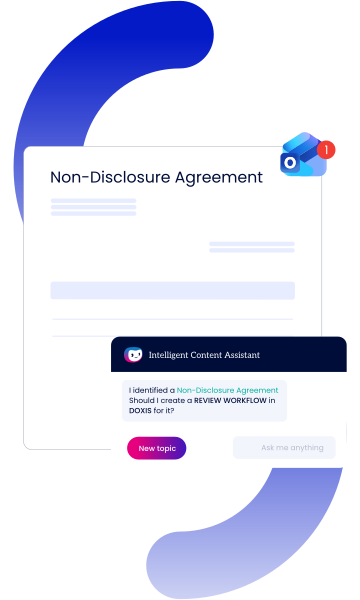
1. Understand the content
Doxi analyzes the document you're working on, whether it's an email, Word file, PowerPoint presentation, or PDF, and recognizes what it contains, such as a contract, invoice, or customer request.
2. Capture the relevant information
It extracts the data needed for the document type, such as names, dates, contract numbers, amounts, or key clauses, and prepares it as structured metadata.
3. Recommend the next step
Based on the document and its content, Doxi suggests the most relevant action, such as filing the document, adding metadata, or starting a workflow.
4. Execute the action
With a single confirmation, Doxi completes the task directly in Doxis, filing the document, launching a workflow, or creating a new record, while always respecting the user's permissions.
5. Ask questions anytime
Need more context? Use the built-in AI chat to summarize documents, answer questions, or translate content to your preferred language.
Doxi integrates with your systems






Curious how we can help you?
Get in touch with us today.
Where compliance, expertise & industry recognition
come together
Secure

Compliant

Recognized
Doxis is a leader!
Gartner® Magic Quadrant™ for Document Management 2026
Partners

Why organizations pick Doxis for AI-assisted content work
Finding the right information shouldn't depend on who's asking or which system it landed in. Here's what teams get when AI document search runs on Doxis.

Works where you work
Connected to Word, PowerPoint, Outlook, and PDF documents.

Turns insight into action
Suggests the next step, from filing documents to starting workflows.

Respects your permissions
Only accesses the content you're already authorized to see.

Supports every language
Ask questions and summarize documents in your preferred language.

Uses shared metadata
Works with the same metadata and business objects across the Doxis platform.

Built for governance
Every action follows the same security, audit, and compliance rules as Doxis.
What our clients say about us
See why organizations worldwide trust Doxis to improve efficiency, streamline processes, and achieve lasting business value.

Günter Holst,
Head of Quality & Project Management - AviationPowerGroup
"We’ve significantly accelerated our invoice processing with Doxis. Now we have better liquidity planning, meet our payment deadlines and take advantage of cash discounts."

Martin Treder,
Global IT, DHL Express
"We searched the world for a suitable solution for our document management and the answer was right in front of us all along – just across the Rhine river at Doxis."

Benjamin Schaller,
Head of Archiving & Document Services, SEW-EURODRIVE
"We are processing much more than we used to with the same amount of people. We can do more without hiring people and follow up many more quotations."

Robert Jaksch,
Team Manager ECM, adesso SE
"The integration of Doxis and SAP SuccessFactors significantly enhanced process efficiency and speed in HR."

Dr Steen Dupont,
RECODE Programme Manager, Natural History Museum
"Doxis will help us to create a next-generation collections management system which will benefit the community and further modernize the Museum’s collection management system."

Ilaria Patri,
Head of Group Legal Compliance & Internal Audit, Member of the 231 supervisory body
"Doxis provided the perfect solution to manage compliance issues in an innovative way."

Lars Schmerge,
ECM Project Manager, Bernard Krone Holding
"Why did we chose Doxis? From the very beginning they were on a level with us and their solution fulfilled all of our requirements."

Gudrun Otte,
Head of project and quality management, FCA Bank
"Switching to the Doxis ECM suite opens up a range of new technological possibilities, such as electronic record management."

Petra Haas,
Project and Department Head of Organization Management, Aareal Bank
"We launched a centralized ECM platform with the goal of creating order, transparency and auditability within our corporate document-based processes. With Doxis, we’ve reached this goal."

Gundolf Hallmann,
Area Manager of Finance and Accounting, Bofrost*
"Our goal was to shorten the invoice processing time and to have a more efficient and audit-proof structure. We achieved this thanks to Doxis. A win for the company and for the employees."


