Document processing: Why automation matters

Technologies, Workflows and Processes

Automated workflows efficiently capture, analyze, process and save documents in the audit-proof archive – without you having to lift a finger. Not only do you keep on top of the rising tide of data and reduce your dark data woes, it enhances operational efficiency at the same time.

Keep reading to discover the compelling reasons why you should consider automating your document processes, and how to optimize individual process steps with modern ECM-based automation for significant productivity gains.

Why are companies being told to automate their document processes?

In almost all companies, automation is the motor for efficient, scalable and legally compliant processes. And documents are central to nearly every process. Here are three key reasons why companies should seriously consider document process automation:

1. Automation boosts productivity

The productivity gains from automation are game-changing. Instead of spending hours on routine manual tasks, like capturing, searching and classifying documents, structured document processes serve up information to employees fast and provide direct access to relevant documents through workflow automation.

Imagine this: A document arrives in the inbox and is instantly captured by an AI-assisted document management system (DMS), which saves it to the right electronic file and initiates the corresponding workflow. DMS automation at this level speeds up research activities and handoff times while saving resources.

2. Automation minimizes manual mistakes

Automated systems eliminate the mistakes associated with manual processing by executing standardized processes based on defined rules. For instance, automate your data reconciliation processes and cut out the risk of manual errors during invoice verification. The DMS automatically extracts relevant information such as due amounts and payment terms from the documents and matches it against existing data in your ERP system or similar.

3. Automation increases transparency

In an automated landscape, all document management steps are automatically logged to ensure every activity remains transparent and traceable. Version control gives you full insight into who modified which part of a document and when. Automating your IT processes adds an extra layer of assurance that everyone consistently fulfills compliance and legal requirements.

Which types of software automation are available for document management?

In the world of document management, there are essentially two types of software automation:

Rule-based workflows

Rule-based workflows use a predefined rule and condition to automatically trigger a specific action. Take an automated invoice release process for example: The system detects a verified invoice, automatically launches a workflow and informs the right person that the invoice is awaiting release. If that employee happens to be on vacation, the deputy rule is activated and the system routes the task to their assigned deputy.

Document archiving is another example of a rule-based workflow. Once the system sees an invoice has been approved, it automatically files the document in the audit-proof archive.

Artificial intelligence

AI-powered automation harnesses machine learning (ML) and natural language processing (NLP) technologies to analyze and categorize documents and automatically extract high-quality information. Here are some examples of artificial intelligence used in automation:

  • AI identifies and extracts key information from documents, such as the contract term.
  • AI processes data from different documents and creates summary reports or analytics.
  • AI recognizes document content and assigns it to a specific category, such as “invoices,” “contracts” or “applications.”
  • AI analyzes contracts and other documents for irregularities or risks – like missing signatures or inconsistent data.

Automated input management right from the inbox

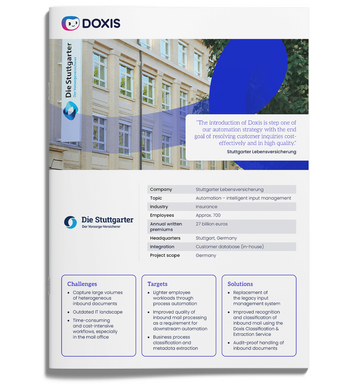
See how Stuttgarter Lebensversicherung intelligently processes incoming mail with Doxis and clears the path to further process automation.

Read now

Automation in Doxis ECM software: Real-world examples

Hey Doxi, which ECM automations are possible with Doxis?

Automated input management: Doxis automates inbound document processing. The ECM system classifies the documents, extracts high-quality information and launches the right workflow.

Date management and reminders: Doxis keeps track of important dates and automatically sends out reminders to the relevant people. No more missing critical deadlines. Now you can relax knowing contracts will be renewed, invoices paid and other important deadlines met at the right time.

Signature workflows: Doxis automates the entire signature process – from selecting the signatory to archiving the signed document.

Automated vacation and sickness deputization: Doxis automates vacation planning and sickness deputization by recording absences and automatically triggering deputy rules. This keeps workflows running smoothly even when the usual people aren’t there.

Role-based permissions and access management: Doxis automatically manages access privileges for documents and document content on the basis of user roles. It ensures only authorized people can access confidential information.

DMS automation best practice: Automatic posting

Doxis lets you automate even entire processes from start to finish. Here’s how automatic posting works in inbound invoice processing:

  1. Incoming invoice: With interfaces to third-party systems, Doxis automatically catches incoming invoices across all inbound channels. The integrated OCR function then converts PDFs and image scans into a machine-readable format.
  2. Data extraction: Doxis extracts the invoice contents and saves them in a structured format for further processing. The built-in AI support ensures this is done accurately and entirely automatically.
  3. Invoice verification: Doxis checks that all invoice content meets formal requirements and matches it to the order confirmation or other related documents.
  4. Posting and archiving: Doxis then posts the verified invoice in real time and audit-compliantly archives it in the correct electronic file.

One last word: Automated document processes with ECM

An intelligent ECM system is the key to automating tasks such as document capture, classification and archiving, which takes a big chunk of the busywork off your employees and boosts productivity. And with transparency and traceability throughout, ECM automation with Doxis keeps your document processes fully compliant with all relevant regulations.

Discover related topics

FAQs on Automation

What is the role of AI in automation?
Artificial intelligence (AI) is a major driver of automation, capable of handling complex, data-intensive tasks and optimizing processes. AI uses algorithms, machine learning and natural language processing (NLP) to recognize patterns, learn from experience and automate decision-making.
What are the different levels of automation?
Automation takes place on three main levels: 1. Full automation – the entire process runs without human intervention 2. Partial automation – humans are still needed in the mix for certain tasks 3. Robotic process automation (RPA) – software robots carry out repetitive tasks
Which processes are suited to automation?
Any repetitive process that is carried out on a regular basis, such as document management, invoice processing and customer communication. Automating processes in these areas saves time, reduces mistakes and boosts efficiency.
What are the challenges of automation?
The biggest challenges lie in integrating new automation solutions with existing systems, safeguarding data quality and training employees to use the new technologies.

Discover the new generation of ECM

Would you like to learn more about Doxis ECM platform? Schedule your personal live demo of Doxis or arrange for us to visit your company to show you its potential live and up close. We look forward to hearing from you!


What is the sum of 2 and 1?

How can we help you?

+49 (0) 30 498582-0
Please add 7 and 1.

Your message has reached us!

We appreciate your interest and will get back to you shortly.

Contact us