

First notification of loss: how to automate FNOL from first report to claim file
|
First notification of loss (FNOL) is the moment a claim reaches your insurer. Automating it means the claimant reports everything in one structured form, and a complete claim file lands with the right claims handler without anyone retyping a thing.
That first step happens at enormous scale. According to the Association of British Insurers (2026), UK insurers paid a record £6.1 billion in property claims in 2025, including almost £3.4 billion across more than 560,000 home insurance claims. Every one of them started with a first notification.
This guide walks through the full FNOL process in six steps, from the first report to a claim file that stays complete as new documents arrive, alongside the claims system you already run.
Key Takeaways
- Claims automation pays off fastest at first notification of loss, because every claim passes through it
- A structured digital form captures the full report at the source, so claims start complete
- The claim document, claim number and claim file are created automatically, and routing assigns the file to the responsible claims handler
- Claimants get an instant confirmation with their claim number and a direct contact, which supports the FCA's Consumer Duty
- Documents that arrive later by email or post are read and filed to the right claim automatically
What is first notification of loss?
First notification of loss (FNOL) is the first report a policyholder or third party makes to an insurer after damage or theft. It opens the claim and captures the basic facts, such as what happened and when. In the US, the same step is called first notice of loss.
FNOL automation means software turns that report into a complete claim file and routes it to the right claims handler, so nobody has to retype it.
Why claims automation should start at first notification
The delay at FNOL comes from fragmentation. A first notification arrives by email, letter or web form, and each channel lands in its own queue. Before anyone assesses the claim, someone has to find it and match it to a policy.
German insurer DEVK knows this well. Before automating, its claims mail came in through separate channels and was handed out to staff through Outlook. Nobody could see a colleague's queue, so covering an absence meant hunting through inboxes.
The second delay is the incomplete notification. A report without a policy number or photos of the damage waits until a claims handler reads it and calls the customer back. Every day in that loop is a day the customer waits for a first response.
How to automate the FNOL process, step by step
Hey Doxi, how do I automate the FNOL process from first report to complete file?
Step 1: Give claimants one structured digital form
Start with the channel you control. A digital claim form on your website, app or customer portal asks for everything a claims handler needs from the outset. That covers the parties involved, how the incident happened, the date and time, and the damage.
The form adapts to each answer. A motor claim asks about the other driver, and a burst pipe asks about the affected rooms. Claimants upload photos of the damage directly in the form, so the first report arrives complete.
Doxis SmartForms works this way, and business teams build and change the forms without code.
Step 2: Generate the claim document and open the claim file automatically
As soon as the claimant submits the form, a claim document is generated with all the information they entered. A claim number is created, and a new claim file opens within the customer's file.
Every claim file follows the same predefined structure. Its overview shows the key facts of the claim at a glance, so the claims handler can start work without opening a single attachment.
Some insurers prefer to send the form data straight into their claims management system. The claims handler then reviews the case there and requests extra information through another form when needed. For letters that depend on the case, such as a request for specific documents or an explanation of a declined claim, Doxis DocComposer creates a personalized letter the handler can edit before sending.
Step 3: Route the file to the responsible claims handler
Routing rules then assign the file to the responsible claims handler. You configure those rules yourself, for example sending straightforward, low-value claims to a fast-track queue and high-value claims to a senior claims handler.
DEVK assigns each case by skill and capacity with its own assignment tool, so work keeps moving when someone is out.
Step 4: Confirm the claim to the claimant right away
The claimant receives an email straight after submitting, with the claim document, their claim number and a summary of the claim. The summary names the responsible claims handler and gives their contact details, so the claimant knows who to call with a question.
That instant confirmation is the first sign of support a claimant sees, and it heads off calls asking whether the claim arrived.
Step 5: Follow up on what's missing
When something is missing, such as photos of the damage, the form itself asks for it. Items that only become available later are requested by automated workflows, which follow up with the claimant at the right time.
Because every claim file has the same structure, an empty folder shows at a glance which documents are still outstanding. For serious claims, your team requests additional documents as needed, such as expert assessments or medical reports.
Suspicious cases go to review with every document already attached.
Step 6: Capture every document that arrives later, from any channel
Claimants keep sending documents after the first report, by email, post or upload. Automatic document classification recognizes each document type and extracts the claim number, which files it to the right claim.
DEVK handles up to 4,000 letters a day this way, with scanned paper mail and email feeding the same workbaskets.
Your claims system stays the system of record for claims data. Receipt, assignment and handling steps are timestamped, and the audit trail gives you a traceable record to draw on when the FCA or your auditors ask about a claim.
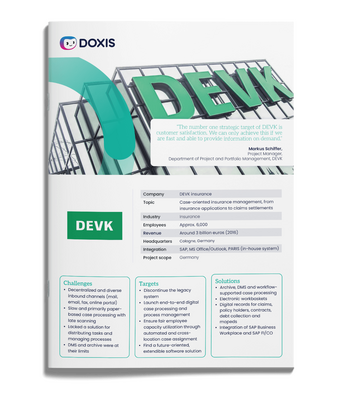
DEVK cuts mail distribution effort by 75% with Doxis
German insurer DEVK automated inbound mail for its claims division and now routes up to 4,000 letters a day from every channel to the right handler's workbasket.
Discover how DEVK went digitalWhat UK and EU rules mean for FNOL intake
UK and EU rules set no fixed deadline for responding to a first notification. They do shape what good intake looks like:
|
Rule |
What it asks of insurers |
What it means at intake |
|
FCA ICOBS 8.1.1R (UK) |
Handle claims promptly and fairly |
Each claim file reaches the responsible handler on submission, and every step is recorded |
|
Consumer Duty (UK, since July 2023) |
Support customers throughout the product lifecycle, including claims |
Instant confirmation, a named claims handler and early requests for missing information |
|
GDPR and UK GDPR |
Extra protection for health data (Article 9) |
Access to claim files is restricted, and retention rules apply from the first document |
Doxis keeps every claim document in the claim file with a complete audit trail, so you can show how each claim was handled.
How to measure FNOL automation
Measure from the first week, so you can show where time goes before and after. The same numbers support the outcome monitoring the Consumer Duty expects.
These five metrics show whether the process is working:
|
Metric |
What it tells you |
Where to start |
|
Digital form share |
Share of first notifications submitted through the structured form |
Track by line of business |
|
Same-day assignment rate |
Share of claims assigned to a handler on the day they arrive |
Split by channel |
|
Time to confirmation |
Time from submission to the claimant's confirmation email |
Compare with your own service standards |
|
Missing-information rate |
Share of claims that needed a follow-up request |
Split by line of business |
|
Manual touch rate |
Share of later documents where staff fixed or added data |
Track the claim number first |
Read the numbers by line of business. A rising form share and a falling missing-information rate show the process is working at the source.
Start claims automation at first notification with Doxis
Doxis covers the full FNOL process on one platform, from the claimant's first report to a complete claim file with the responsible claims handler. Your claims system stays the system of record.
Every part of the process runs on the same platform, so every claim document stays in one place and every step can be traced.
- Structured claim forms for your website, app or portal, built without code
- Automatic claim documents, claim numbers and claim files
- Routing rules that assign each claim to the responsible claims handler
- Instant confirmation emails with the claim number and handler contact
- Automated follow-up for missing documents
- Automatic classification and filing of documents that arrive later
- Personalized letters with DocComposer, for example to explain a declined claim
Doxis is a Leader in the Gartner® Magic Quadrant™ for Document Management 2026. Request a free demo to see how Doxis fits alongside your claims system.
Automate Work. Accelerate Business.
Bring together AI, ECM, and workflow automation in one powerful enterprise platform.
FAQs on first notification of loss (FNOL)
What does FNOL mean in insurance?
FNOL stands for first notification of loss. It's the first report a policyholder makes to the insurer after a loss, and it starts the claims process.
What is the difference between first notification of loss and first notice of loss?
They describe the same step. First notification of loss is the common UK term, and first notice of loss is the US term.
Can claimants upload photos when they report a claim?
Yes. Photos of the damage are uploaded directly in the digital claim form, and the form requests them if they're missing.
What happens to documents sent after the first notification?
They're classified automatically, and the claim number is used to file each one to the right claim file, whether it arrives by email, post or upload.
Can FNOL automation work with my existing claims system?
Yes. FNOL automation runs alongside your claims system, which stays the system of record, and connects to it through interfaces set up during implementation.
Does automating FNOL replace claims handlers?
No. Automation takes over data entry and filing, and claims handlers keep every decision about cover and settlement.
Is there a deadline to respond to a first notification of loss in the UK?
The FCA's ICOBS rules set no fixed number of days. They require insurers to handle claims promptly and fairly, and the Consumer Duty expects support throughout the claim.
Where should an insurer start with claims automation?
Start with one high-volume line of business and a digital claim form for it. Measure the form share and the missing-information rate, then add lines once the process holds.


How can we help you?
+49 (0) 30 498582-0Your message has reached us!
We appreciate your interest and will get back to you shortly.