













How ERP integration works with Doxis
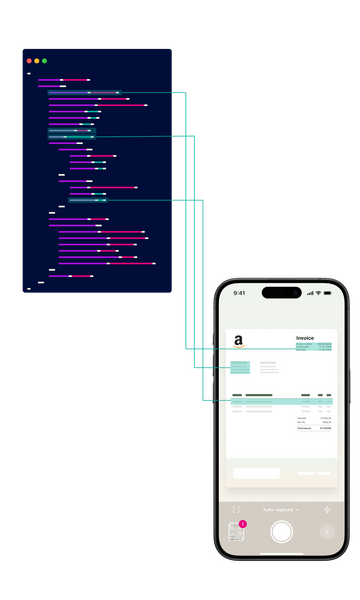
Doxis connects to your ERP through Doxis ERP Connection Service, which handles the data exchange between Doxis applications and the ERP. Each document then moves through five steps, from arrival to archive.
1. Connect your ERP
Doxis ERP Connection Service links Doxis to your ERP through a certified connector, a packaged connector, or a REST or database connection configured for your system.
2. Capture every document
AI reads incoming documents, classifies them and extracts the data your ERP needs, whether a document arrives as a scan, a PDF or an email attachment.
3. Check it against your ERP.
Doxis looks up vendor master data, purchase orders, payment terms, tax codes and account assignments in the ERP to validate each document.
4. Post and link
Validated invoice data is posted or pre-captured in the ERP, with the invoice linked to the ERP record.
5. Archive and govern
Every document is stored in an audit-proof archive with retention rules, access rights and a complete audit trail.
ERP system integration: three ways Doxis connects to your ERP
ERP landscapes differ, so Doxis ERP Connection Service offers three connection types. Knowing which one applies to your ERP tells you upfront how much of the integration is product and how much is project.

Certified standard connector
For SAP, Doxis provides certified interfaces and embedded products. The connection is part of the standard product and is recertified regularly, so no custom development is needed.

Packaged connector for Microsoft Dynamics 365
For Microsoft Dynamics 365 Finance & Supply Chain Management in the cloud, a packaged connection service covers invoice automation.

API or database connection for other ERPs
For other ERPs, Doxis connects through a web interface (REST API) or directly to the database. Each function is configured as a project, so plan who maintains the connection after go-live.
ERP integration use cases
The value of ERP integration shows in specific, document-heavy tasks. Each use case below starts from a document your teams handle every day and ends in the ERP record it belongs to.

Invoice processing
Capture supplier invoices, check them against ERP vendor and order data, and post them with the invoice linked.
Learn more →

Order confirmations
Compare every confirmation with the purchase order in your ERP and route deviations straight to the buyer.
Learn more →

Customer and supplier files
One file per business partner, filled automatically with documents and index values from your ERP.
Learn more →

Archive replacement
Migrate the legacy archive behind your ERP during live operation and connect its documents to your ERP records.
Learn more →

Curious how we can help you?
Get in touch with us today.
Duravit connects 25 million documents to its ERP with Doxis
- 25 million documents managed centrally on one platform
- 5,000+ documents a day taken over from the ERP
- 20 million documents migrated during live operation
- Almost 700 users working in ERP-linked customer and supplier files
Why enterprises choose Doxis for ERP integration
Enterprises with large ERP landscapes choose Doxis because it scales across companies, sites and systems.

Faster invoice processing
At Eissmann Group Automotive, processing time per invoice fell from 15 to 17 minutes to 5 to 8, and the same team now handles 100 to 120 invoices a day.

Built for more than one ERP
One Doxis platform serves several ERPs: Bernard Krone runs 14.6 million documents for 500 users across two ERP systems.

Documents in the ERP context
Open contracts, delivery notes and invoices directly from the ERP transaction, with document management functions such as versioning and full-text search.

Workflows across systems
Doxis workflows take ERP transactions into end-to-end processes with web-based approvals, and every step is logged for audits.

Compliance built in
Doxis archives ERP documents audit-proof, applies retention periods automatically and keeps a complete audit trail. Fully GDPR and ISO 27001 compliant.

Recognized by analysts
Doxis is a Leader in the Gartner® Magic Quadrant™ for Document Management 2026, for the second consecutive year.

SEW-Eurodrive hits top speed with Doxis
Forrester confirms it: 90% time savings with process automation
In a three-year Total Economic Impact™ study, Forrester analyzed how SEW-Eurodrive uses Doxis to streamline and automate its processes. Beyond achieving 90% faster document processing, here’s what else the company unlocked:
Time savings
90%
return on investment
336%
payback
<6 months
Integration in your IT landscape








Your return on information with Doxis
ERP integration is one capability inside Doxis Intelligent Content Automation, the AI-powered platform from Doxis, The Document Intelligence Company. The same platform connects, understands and automates information across the entire document lifecycle, so your return on information does not stop at a single use case.
Do more with Doxis Intelligent Content Automation:
- Capture and understand: AI reads, classifies and extracts data from any document, then validates it against your systems
- Manage and automate: Store content in one place with audit-ready governance, and drive document-centric workflows from intake to action
- Connect your systems: Link content to the tools you already run, with 200+ integrations including SAP and Salesforce
Where compliance, expertise & industry recognition
come together
Secure

Compliant

Recognized
Doxis is a leader!
Gartner® Magic Quadrant™ for Document Management 2026
Partners


How can we help you?
+49 (0) 30 498582-0Your message has reached us!
We appreciate your interest and will get back to you shortly.