

How to automate order-to-cash for SAP: a step-by-step guide for enterprises
|

Your sales team closes the deal. Then the order sits in an inbox, waiting for someone to key it into SAP by hand. Mismatched prices, missing purchase order numbers, and delayed invoices turn a simple transaction into a multi-day scramble, and every day of delay pushes your cash further out of reach.
According to McKinsey & Company, one industrial manufacturer discovered that broken order-to-cash processes caused leakages across multiple steps, together amounting to 3 to 5 percent of EBITDA. Recovered, that gap represents millions of dollars.
This guide walks you through how to automate order-to-cash for SAP step by step, from digitizing order intake to connecting invoicing directly to SAP, so you can close the gap between order and payment.
Key takeaways
- Order-to-cash automation for SAP connects order intake, validation, invoicing, and archiving into a single digital workflow, natively inside SAP.
- Manual O2C processes create leakage that McKinsey estimates at 3 to 5 percent of EBITDA for some organizations.
- The step-by-step process below covers seven stages, from mapping your current workflow to real-time performance monitoring in SAP.
- SEW-EURODRIVE achieved a 336% ROI and a payback period under six months after automating its content-centric workflows with Doxis.
- Choosing the right SAP order-to-cash automation software means checking native SAP integration depth, multi-channel input support, and AI-driven validation.
What is order-to-cash automation for SAP?
Order-to-cash automation for SAP is the use of software to digitize and streamline the entire order-to-cash cycle inside SAP, from the moment a customer places an order through quotation, order confirmation, delivery, and invoicing to final payment. It replaces manual data entry and paper-based handoffs with automated capture, validation, and processing, connected natively to SAP ERP or SAP S/4HANA.
The real cost of ignoring order-to-cash automation for SAP
Order-to-cash touches nearly every function in your business: sales, finance, legal, and customer support. When those functions operate on disconnected systems and manual SAP entry, small errors compound quickly.
McKinsey found this firsthand at one industrial manufacturer. Its reported bad debt looked like a manageable 0.1 percent of sales.
A deeper investigation told a different story. Credit memos issued by the customer service team, driven by a validation process with weak oversight, pushed the real figure closer to 0.4 percent of sales, a loss that never reached the collections department's radar at all.
That pattern repeats across industries. Orders get stuck waiting for manual credit checks. Invoices go out with pricing errors that trigger disputes. Each disconnect extends the time between order and cash, and each one is invisible until someone goes looking for it.
How to automate your order-to-cash process for SAP: step by step
Hey Doxi, how to automate the order-to-cash process for SAP?
Automating order-to-cash means making a sequence of connected changes, each one building on the last.
1. Map your current O2C workflow in SAP
Before automating anything, document how orders actually move through SAP today, not how the process diagram says they should. Track every handoff: which team touches the order, which SAP transaction it lands in, and where it waits.
Most organizations find their real bottlenecks are not where they expected. A credit check that "usually takes a day" might routinely take three. Mapping the actual flow, not the intended one, tells you where automation will have the biggest impact.
2. Digitize and centralize order intake
Customer orders arrive through a mix of channels: email, PDF, fax, EDI, IDoc, and increasingly through supplier networks like SAP Ariba. Without a single intake point, each channel needs its own manual process, and orders get lost between them.
Multi-channel input management pulls every order type into one place, regardless of format, and makes the order data available immediately for the next step. This is the foundation everything else builds on.
3. Automate order validation with intelligent rules
Once an order is captured digitally, it needs validation: does the price match the contract, is the material number correct, can the customer's credit limit absorb the order? Doing this manually means a person cross-checking each field against SAP master data.
AI-powered assistants validate prices, material numbers, customer records, and delivery data automatically, flagging only genuine discrepancies for human review. Smart rules then let you automatically post orders that pass validation cleanly, so your team only handles the exceptions.
4. Connect order processing directly to SAP
Automation only pays off if validated orders flow straight into SAP without a second round of manual entry. That means direct integration, not a bolt-on software that requires exporting and re-importing data between systems.
This is where a purpose-built order-to-cash automation software for SAP matters. Direct access to SAP transactions, customer records, and material master data lets your team jump straight from an order to the related SAP screen, without leaving the process to search for context.
5. Automate invoicing and e-invoice delivery
Once goods ship, invoicing needs to happen fast and correctly. Outgoing invoices should route automatically to the right channel, whether that is an e-invoicing portal, EDI, or email, in the format each customer or country requires.
A Billing Monitor gives you a live view of every outgoing invoice: shipment status, payment status, and recipient details, all in one place. That visibility is what lets your finance team catch a stalled invoice before it becomes a stalled payment.
6. Archive documents for compliance
Every order, invoice, and delivery note carries a legal retention requirement, and requirements vary by country and document type. Manual archiving means someone has to track those deadlines and file the right documents in the right place.
Automated archiving tied to your order-to-cash workflow applies retention rules consistently and deletes documents on schedule once they expire, so compliance stops depending on someone remembering to do it.
7. Monitor performance with real-time SAP analytics
Automation without measurement is a guess. Track order-to-cash performance the same way you would any other business-critical SAP process: processing time, exception rates, invoice accuracy, and time from delivery to payment.
Dashboards built on your live order and billing data let you spot a slowdown in a specific channel or customer segment before it shows up in your DSO figures three weeks later.
Order-to-cash automation for SAP in practice: SEW-EURODRIVE's results
Numbers are useful, but a real deployment shows what automation looks like in practice. SEW-EURODRIVE, a global manufacturing company, had run largely manual processes for archiving and managing data for years. Bottlenecks, error-prone data entry, and added headcount to manage paper-based work were the norm.
After moving to a single global content automation platform with SER Doxis, the company gained robust SAP integration, automated workflows, and stronger visibility for auditing and compliance. According to the Total Economic Impact™ study by Forrester Consulting, SEW-EURODRIVE achieved a 336 percent ROI and a net present value of €13.38 million over three years, with payback in under six months.
Automated content-centric workflows saved the company 70 percent of processing time in year one, rising to 95 percent in years two and three. That is what compounding automation gains look like once the foundational steps above are in place.
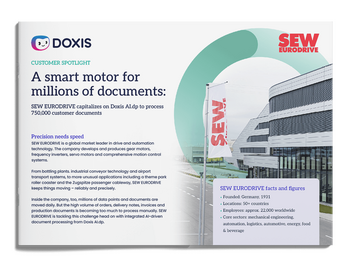
SEW-EURODRIVE: A smart motor for documents (copy)
SEW-EURODRIVE capitalizes on Doxis to process 750,000 customer documents per year
Read nowHow to choose the right order-to-cash automation software for SAP
Not every order-to-cash automation software fits every SAP landscape. A few criteria separate a genuine fit from a costly mismatch.
- Native SAP integration depth: Look past "connects to SAP" and check what that actually means. Does the software give direct access to SAP transactions and master data, or does it require exporting data and re-importing it later? Native integration is the difference between real automation and a faster manual process.
- Multi-channel input coverage: Your customers will keep sending orders through whatever channel is easiest for them. The software needs to capture email, PDF, fax, EDI, IDoc, and portal-based orders like SAP Ariba without forcing you to build separate workarounds for each.
- AI-driven validation, not just OCR: Extracting text from a document is only half the job. The software should validate that extracted data against your master data automatically and flag genuine exceptions, rather than routing every order to a human reviewer.
- Compliance and archiving built in: Retention rules differ by document type, country, and industry. Confirm the software applies those rules automatically rather than treating archiving as a separate project.
- Proven results at your scale: A vendor's case studies should reflect organizations similar in size and complexity to yours. Ask for specifics: ROI, payback period, and how long the deployment took.
Key benefits of order-to-cash automation for SAP
Automating order-to-cash inside SAP pays off in ways that show up across finance, sales, and customer service, not just in one department's metrics.
Faster cash conversion
Automated validation and invoicing remove the delays that stretch out DSO. Orders move to invoicing the moment they clear validation, and invoices reach customers through their preferred channel without waiting on a manual batch run.
Fewer errors and disputes
Intelligent validation catches pricing mismatches, incorrect material numbers, and delivery discrepancies before an order ever posts. Fewer errors at intake means fewer disputes at invoicing, and fewer disputes means fewer stalled payments.
Lower processing costs
Every order that posts automatically is one your team does not have to key in, check, or chase down later. SEW-EURODRIVE's 70 percent time savings in year one shows how quickly that adds up once the manual steps disappear.
Better compliance and audit readiness
Automated retention rules and audit-proof archiving mean your order-to-cash documents are stored correctly the first time, not reconstructed under pressure during an audit. Retention periods run on schedule instead of on memory.
Stronger customer experience
Customers notice faster order confirmations, accurate invoices, and fewer follow-up calls to sort out a discrepancy. A smoother order-to-cash process is part of what keeps them ordering from you again.
Automate order-to-cash for SAP with Doxis
If your order-to-cash process still runs on inboxes, spreadsheets, and manual SAP entry, you are absorbing costs that could be recovered. Doxis Order-to-Cash Automation for SAP digitizes every stage of the process, from incoming customer inquiries to e-invoicing and legally compliant archiving, fully embedded in SAP.
Doxis brings together the capabilities this guide covers into one platform:
- Multi-channel input management for email, PDF, fax, EDI, IDoc, and SAP Ariba orders
- AI-powered assistants that validate prices, material numbers, and delivery data automatically
- Smart rules for fully automated order posting when validation passes
- An Order Monitor and Billing Monitor for a complete, real-time view of every order and invoice
- E-invoicing across formats and channels, meeting country- and industry-specific requirements
- Legally compliant archiving with automated retention and deletion for SAP data and documents
Doxis is recognized as a Leader in the Gartner® Magic Quadrant™ for Document Management, and manufacturing customers like SEW-EURODRIVE have seen measurable returns from automating with the platform.
Request a free demo below to see how Doxis Order-to-Cash Automation for SAP S/4HANA fits your process.
Automate Work. Accelerate Business.
Bring together AI, ECM, and workflow automation in one powerful enterprise platform.
FAQs on order-to-cash automation for SAP
What is order-to-cash automation for SAP?
Order-to-cash automation for SAP is the use of software to digitize and streamline the process from customer order through quotation, invoicing, and payment, replacing manual data entry with automated capture and validation connected natively to SAP.
What are the main stages of the order-to-cash process?
The core stages are inquiry, quotation, sales order, order confirmation, delivery, billing, invoice delivery, receipt of payment, and archiving.
How does order-to-cash automation for SAP reduce DSO?
It reduces delays at each handoff, faster order validation, quicker invoice delivery, and fewer disputes from data errors, which shortens the time between shipment and payment.
How does order-to-cash automation software integrate with SAP?
Purpose-built SAP order-to-cash automation software, such as Doxis Order-to-Cash Automation for SAP S/4HANA, integrates directly with SAP transactions and master data rather than operating as a separate system.
What channels can order-to-cash automation software for SAP handle?
Leading platforms support email, PDF, fax, EDI, IDoc, and portal-based orders like SAP Ariba, consolidating them into a single intake point that feeds directly into SAP.
Is order-to-cash automation for SAP only for large enterprises?
No, but the ROI scales with order volume and process complexity. Organizations with high order volumes, multiple input channels, or complex SAP landscapes see the fastest payback.
How long does it take to see ROI from order-to-cash automation for SAP?
Results vary by organization, but SEW-EURODRIVE achieved payback in under six months using Doxis, according to Forrester's Total Economic Impact™ study.
What should I look for in order-to-cash automation software for SAP?
Prioritize native SAP integration, multi-channel input coverage, AI-driven validation, built-in compliance and archiving, and proven results from organizations similar to yours in scale.



How can we help you?
+49 (0) 30 498582-0Your message has reached us!
We appreciate your interest and will get back to you shortly.