

Underwriting automation: How to automate everything around the decision
|

Underwriting automation means letting software handle the work around the underwriting decision: intake, data extraction, completeness checks, routing and the underwriting file. Pricing and the decision itself stay with your underwriters and your core insurance systems.
That split matters because the work around the decision is where underwriting time goes. In Accenture's 2024 underwriting survey, underwriters still spent more than a third of their time on non-core work such as data collection and admin.
This guide shows you where to draw the line, which rules to set before you build anything, and how to automate underwriting end to end, up to an underwriting file that stands up to an audit.
Key Takeaways
- Automate intake, data extraction, completeness checks, referral routing and the underwriting file, and keep pricing and the decision with your underwriters
- Four capabilities share the work on one platform: digital forms and letters, document processing, process automation and the underwriting file
- A structured digital application form removes keying at the source, and documents that arrive later are read and filed automatically
- Confident data passes straight through, while uncertain fields, tampering flags and cases above authority go to a person
- Under the EU AI Act, AI used for risk assessment and pricing in life and health insurance is high-risk, with obligations applying from December 2, 2027
- The UK now allows significant automated decisions with safeguards, but decisions based on health data remain restricted, so keep a human with real authority in every underwriting decision
What is underwriting automation?
Underwriting automation is the use of software to collect, check and route the documents and data an insurer needs to assess a risk, from applications to broker submissions. Underwriters still make the decision, using cleaner data that arrives faster. In lending, the same term refers to loan approval, which this guide doesn't cover.
What to automate in underwriting and what to keep with your underwriters
Automate the steps that move and check information, and leave every judgment call with your underwriters. Most underwriting backlogs build up before anyone looks at the risk, while someone rekeys data and chases missing documents.
The table shows a practical split across a typical underwriting process.
|
Underwriting stage |
What software handles |
What stays with your team or core systems |
|
Intake |
Takes applications through a digital form, or collects them from email, portals and scans, and sorts them by document type |
Choosing which channels and lines of business come first |
|
Data extraction |
Reads key fields into structured data |
Checking fields the software flags as uncertain |
|
Completeness checks |
Flags missing documents and signs of tampering |
Deciding whether to ask the broker for more |
|
Broker and applicant communication |
Confirms receipt and requests missing documents with generated letters |
Explaining decisions that need an underwriter's judgment |
|
Referral routing |
Sends each case to the right underwriter by your rules |
Setting authority limits and referral rules |
|
Risk assessment and pricing |
Passes clean data to your rating system |
The underwriter's judgment and your rating engine |
|
Decision and issuance |
Records the decision in the underwriting file |
The decision itself and policy issuance in your policy administration system |
|
Records |
Keeps the file under retention rules with a change history |
Agreeing retention periods with compliance |
Software prepares the case and keeps the record, and the underwriter decides. That design also makes the regulatory questions in the next section much easier to answer.
Set your guardrails before you automate
Decide early where people stay in the loop, because the rules on automated decisions differ between the EU and the UK. Agreeing on this before you build saves you from redesigning workflows later.
EU: life and health underwriting is high-risk AI
The EU AI Act lists AI used for risk assessment and pricing in life and health insurance for individuals as high-risk in Annex III. If you write that business for EU customers, those systems face strict requirements, including human oversight.
The Digital Omnibus on AI, in force since July 27, 2026, moved the start date for these obligations to December 2, 2027. That gives you time to design oversight properly, and the obligations themselves stay the same.
UK: automated decisions are allowed, with safeguards
The Data (Use and Access) Act 2025 replaced Article 22 of the UK GDPR with new Articles 22A to 22D from February 5, 2026. Significant decisions made solely by automated means are now allowed for ordinary personal data, provided safeguards are in place, such as the right to contest a decision and to have a person review it.
Health data is the exception that matters most for life and protection underwriting. Significant automated decisions based on special category data stay restricted unless a specific condition applies, such as explicit consent.
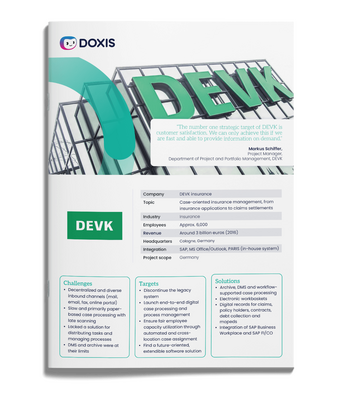
DEVK cuts mail distribution effort by 75% with Doxis
German insurer DEVK automated inbound mail for its claims division and now routes up to 4,000 letters a day from every channel to the right handler's workbasket.
Discover how DEVK went digitalHow to automate underwriting end to end
The fastest way to cut manual data entry in underwriting is to avoid keying the data at all. Let the applicant or broker enter it once in a structured form. The system builds the underwriting file and the next steps from there.
Four capabilities share the work. Digital forms and document generation handle every exchange with brokers and applicants, and process automation moves the case. Content management keeps the underwriting file, and intelligent document processing reads every document that arrives outside the form. Running all four on one platform keeps the data in one place, so nothing gets retyped between steps.
Start where documents cause the most friction, prove it there, then extend. Delvag began with claims files in 2016 and moved underwriting onto digital customer files in 2018.
Step 1: Start with one line of business
Pick a line where submissions arrive in volume and follow a familiar document mix, such as a commercial property book. Map where applications come in and where cases stall now. That map becomes your requirements list.
Step 2: Give brokers and applicants one structured intake channel
Offer a digital application form on your website, portal or broker extranet as the main way to submit a risk. The form asks for everything an underwriter needs from the outset, such as the insured, the requested cover and sums insured.
The form adapts to each answer, so a property risk asks about construction and a liability risk asks about turnover. Supporting documents are uploaded in the same form, and nobody on your team retypes a field.
Step 3: Generate the application document and case reference
As soon as the form is submitted, the system generates an application document with all the information entered and creates a case reference. Every later document and step refers to that reference.
Step 4: Open the underwriting file inside the customer file
The underwriting file opens automatically within the customer's file and follows a predefined structure. Its overview shows the key facts of the risk at a glance, so the underwriter knows the case before opening a single document.
Link that file to your policy administration system and to the claims file, as Delvag did, so an underwriter sees the full history of a customer in one place.
Step 5: Route the case by your referral rules
Your underwriting authorities already define who can accept what: limits by line of business, sum insured or territory. Turn those rules into routing logic, so each case lands with the right underwriter and anything above authority goes straight to a senior reviewer.
Approvals and sign-offs run in the same workflow. A senior underwriter approves inside the file, and the approval becomes part of the record.
Step 6: Confirm receipt and request what's missing
The broker or applicant receives an email straight after submitting, with the application document, the case reference and the name of the responsible underwriter. That confirmation heads off calls asking whether the submission arrived.
Because every underwriting file has the same structure, an empty folder shows which documents are still outstanding. An automated workflow follows up for them, and for complex risks your underwriter requests extra evidence as needed, such as a survey report or medical evidence.
Not every document comes through the form. The next two steps run whenever something arrives later, at any point in the case.
Capture documents that arrive through other channels
Brokers still send schedules, loss histories and surveys by email, and some evidence arrives by post. Paper gets scanned centrally, and emails come in with their attachments.
Each document is classified by its layout or content, and AI-based extraction reads the fields your team would otherwise retype. The case reference assigns each document to the right underwriting file, and rules flag inconsistent or duplicate data. A document check flags signs of tampering on arrival, before a policy is issued.
Send only the exceptions to a person
Each extracted field carries a confidence score. Fields above your threshold pass through, and the rest appear highlighted for your team to confirm or correct. Every correction also improves future extraction.
Decide where people check the data
Plan the human checks before you go live, so your underwriters trust the data that passes through. Set them at these handoff points.
|
Situation |
What happens |
Who checks |
|
Field extracted with high confidence |
Passes through |
Nobody, unless a rule fails |
|
Low-confidence field or failed rule |
Appears in an exception task |
Underwriting assistant confirms or corrects |
|
Medium or high tampering score |
Held for review and kept out of automatic rejection |
Specialist reviewer |
|
Handwritten form or unusual layout |
Sent to review from the start |
Underwriting assistant |
|
Case above authority |
Routed to a senior workbasket |
Senior underwriter |
|
Underwriting decision |
Always made by a person |
Responsible underwriter |
|
Large or unusual risk |
Second sign-off in the workflow |
Second approver |
The table also gives you the evidence of human involvement that the EU and UK rules expect, because each check is recorded in the file.
Connect the underwriting file to your policy administration system
Integration is where many automation projects stall. In the Market Momentum Index IDP Survey 2025 by Deep Analysis and AIIM, difficulty integrating with existing systems ranked third among the reasons enterprises want to change their document processing software.
Bots that type into screens break when a screen changes. An API-based flow passes documents and data straight into your rating and policy administration systems, with webhooks to trigger the next step and a log of every handoff. Scope it as its own project and test it with real cases from your pilot line.
Keep the underwriting file audit-ready after the decision
An underwriting decision can be challenged years later by a regulator or a court. The file has to show what you knew when you wrote the policy, who decided and what changed afterward.
Set these up before you go live:
- Retention periods for each document type, agreed with compliance and applied automatically
- Write-once storage, so documents can't be changed or deleted while retention applies
- Access rights by role, so only the right people can view medical evidence and other sensitive documents
- Audit logging switched on for underwriting files, since many systems let you enable it per document category
- A record of each human decision, with the reviewer's name and the information they saw
Retention and deletion rules also help you meet GDPR and UK GDPR, because personal data from declined or lapsed cases is deleted on schedule.
What to look for in underwriting automation software
Use this checklist when you compare vendors for an enterprise underwriting operation.
- Digital application forms that feed structured data straight into the underwriting file
- Automatic creation of the application document, case reference and underwriting file
- AI-based extraction that copes with changing layouts and scores its confidence for every field
- Human review built into the workflow for uncertain fields and flagged documents
- Tampering checks that flag risk for a reviewer
- Routing by your own referral rules and authority limits
- Document generation for confirmations and broker letters on the same platform
- A managed underwriting file with audit trail, retention rules and access rights
- Integration with your rating and policy administration systems through open APIs and webhooks
Automate the work around underwriting with Doxis
Your underwriters should spend their time on risk, and Doxis takes care of the work around it. Brokers and applicants submit once in a digital form, and the application document, case reference and underwriting file are created automatically. Documents that arrive later are read and filed by case reference, and people confirm only the exceptions.
Doxis brings the four capabilities together on one platform. Intelligent document processing reads every application and submission, and process automation routes each case. Enterprise content management for insurers keeps the underwriting file, and digital forms and document generation handle every exchange with brokers and applicants. The data stays in one place, which keeps every decision traceable.
The same platform also manages your claims files, so underwriting and claims share one customer history, and a new claim can notify the team responsible for the customer automatically.
- Digital application forms that capture structured data at the source
- Application document, case reference and underwriting file created automatically
- Receipt confirmations and broker letters generated from your templates
- Documents from other channels classified, extracted and filed by case reference
- Cases routed by your own referral rules and authority limits
- One underwriting file with retention rules, write-once storage and a change history
Doxis is a Leader in the Gartner® Magic Quadrant™ for Document Management 2026. Request a free demo to see how it fits your underwriting process.
Automate Work. Accelerate Business.
Bring together AI, ECM, and workflow automation in one powerful enterprise platform.
FAQs on underwriting automation
What is AI underwriting?
AI underwriting uses artificial intelligence to support underwriting tasks, such as reading submissions and summarizing cases. In most insurers, AI prepares the case and an underwriter makes the decision.
Can AI make underwriting decisions on its own?
In the UK, solely automated significant decisions are allowed for ordinary personal data if safeguards are in place, but decisions based on health data stay restricted. Under the EU AI Act, AI for life and health risk assessment and pricing is high-risk and needs human oversight.
Does underwriting automation replace underwriters?
No. It removes the admin around the decision, such as rekeying data and chasing documents, so underwriters spend more time assessing risk.
What documents can underwriting automation process?
It handles application forms and broker emails as well as supporting evidence such as medical reports. Each document is classified, and its key data is extracted into the underwriting file.
Can underwriting automation send letters to brokers and applicants?
Yes. Document generation creates receipt confirmations and requests for missing documents from your templates, fills them with case data and stores each copy in the underwriting file.
How does underwriting automation work with a policy administration system?
Through APIs and webhooks. Documents and extracted data reach your rating and policy administration systems directly, with every handoff logged, and the decision is recorded back in the file.
Where should an insurer start with underwriting automation?
Start with one line of business that has steady submission volume and a familiar document mix. Prove the intake and file structure there, then extend it to other lines.
What is the difference between underwriting automation and straight-through processing?
Underwriting automation covers every step software takes over, from intake to filing. Straight-through processing describes cases that go from submission to policy with no manual step, which suits only simple, low-risk business.
What is the difference between underwriting automation and intelligent document processing?
What is the difference between underwriting automation and intelligent document processing?


How can we help you?
+49 (0) 30 498582-0Your message has reached us!
We appreciate your interest and will get back to you shortly.