

How to keep your insurance audit trail compliant and traceable: a guide to choosing audit trail software
|

Keeping your audit trail in line with audit regulations can feel like a mountain to climb. Luckily it's not so bad. All you need to know is how to pick the right audit trail software to assist.
Regulators enforce the rules behind your records. According to the Prudential Regulation Authority (2026), it fined insurer HDI Global SE £4,165,000 in July 2026 for sending it incorrect data over three years. The PRA found the firm had no reliable written processes behind its calculations.
If your claims and policy data are spread across several core systems, the right software also has to follow each record from those systems into your archive and keep its history intact for as long as the rules require.
Key Takeaways
- Good audit trail software logs every action on its own, shows who did what and when, and keeps the history safe from changes
- The FCA wants clear records so they can check you are following their rules
- From 2026, boards of listed insurers say each year whether their key controls work, and they need records like the audit trail to back that up
- The right software tracks how long each file must be kept and when it can go, so you don't have to do it by hand
- German insurer DEVK keeps each claim in one digital file linked to its core systems and handles 32% of claims on the day they come in
What is audit trail software?
Audit trail software automatically records every action taken on a document or record: who did it, in which role, what they did and when. It stores that history in a way users cannot alter, keeps it for the required retention period and lets auditors retrieve the full history of any record on request.
Cornerstones of proper audit trail software
Audit trail software holds up in a regulatory review when it covers six cornerstones. Use them as your checklist when you compare vendors.

1. It records every action automatically
If claims handlers have to log their own steps, some steps get skipped. Look for software that records every access and change in the background, as soon as it happens.
Doxis records each access and change to a document automatically. The history of a claim file builds itself while your team works on it.
2. Every entry answers who, what and when
An auditor wants to know who did what, when, and to which record. Each entry should include the user and their role, the type of action, the date and the affected object.
In Doxis, every recorded operation is indexed with its date, category, operation type, the user and their role, and the database it changed. That structure lets you narrow a history down to one claims handler or one type of action.
3. You decide centrally what gets recorded
If you log everything, the entries that matter get buried. If you log too little, you leave gaps an auditor will find. Good software lets you set in one place which operations are recorded for each process.
Doxis manages audit trail settings centrally on the server. Beyond the standard operations, you can configure custom operations for processes specific to your business, such as a fraud review step in claims.
4. Records stay unchanged and protected
An audit trail only has value if nobody can rewrite it. The documents it describes need the same protection, so no one can quietly swap a version of a claim form after the decision.
With the optional Doxis safeLock, archived files are saved once and can't be changed afterwards. If a lawsuit or investigation is open, you can also put a hold on the files so nobody can delete them.
5. Retention runs on rules
Audit records must be kept as long as the documents they describe. Personal data has to be deleted once its retention period ends. Doing this by hand across millions of policy and claim documents is where compliance slips.
Doxis keeps track of how long each file must be kept and when it can go, for every document type. You set the rules once, and Doxis applies them to every file in your archive, including files that came in from your claims and policy systems.
6. The whole process sits in one history
An audit trail is only complete if it follows a record through every system it touches. When intake, claims handling and archiving run in separate systems, you end up with three partial histories.
Doxis connects to your core systems, from SAP to in-house claims applications, and it handles incoming post and archiving in the same place. When a document is added to an electronic file, the audit trail notes both the document and the file. That way, each claim keeps its full story in one spot.
What regulators expect from an insurer's audit trail
The six cornerstones map directly onto what UK regulators ask of insurers. The table shows the rules compliance teams meet most.
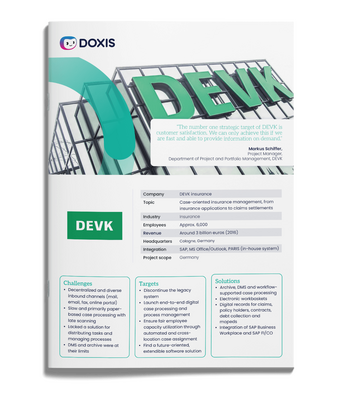
DEVK: Process-centric insurance management
Read all about how DEVK swiftly and securely manages their insurance processes.
Read now|
Who it's for |
Rule |
What you need to keep |
|
Firms regulated by the FCA |
Clear records of your business and deals, good enough for the FCA to check that you follow its rules |
|
|
Insurers regulated by the PRA |
Proof that you run and control your business in a responsible, organised way |
|
|
Any firm that handles personal data |
UK GDPR |
Proof of how you handle personal data, and deleting it once you no longer need it |
|
Listed insurers |
UK Corporate Governance Code 2024, Provision 29 |
A yearly board statement on whether your key controls work |
Each rule asks you to show what happened to a record and that nobody changed it afterwards. Automatic recording and write protection cover the first part. Rule-based retention covers how long you can prove it.
The board statement is the newest of these. Under Provision 29 of the UK Corporate Governance Code, it applies to financial years starting on or after 1 January 2026, and the first statements appear in 2027 annual reports. Many call it UK SOX, and audit trails are part of the proof behind it.
Trace every claim from first notice to settlement
Claims are where a complete audit trail pays off most. When a policyholder disputes a decision or an auditor reviews files, you need to show when each document arrived, who reviewed it and who signed off.
That history breaks when documents arrive by post and through the customer portal while the decision is made in your claims system. Electronic claims files close the gap: every document and every action on the claim lands in one file, linked to the claim in your core system.
DEVK speeds up claims with electronic files linked to its core systems
DEVK, one of Germany's largest car insurers, built electronic claims files connected to SAP Claims Management and its own in-house insurance software. Incoming post is processed automatically and routed into the right file, so the record of a claim starts the moment a document arrives.
- Search across around 400 million documents, so employees find previous claims and policy contracts in seconds
- 32% of claims processed on the day they arrive
Keep the audit history when you replace a legacy archive
Replacing an old archive puts your audit trail at risk. Regulators expect the history of a record to survive the move, including retention periods and legal holds that were in force before it.
Before you switch off the old archive, check these points:
- Inventory which audit records exist for each document type
- Map retention periods and legal holds to the new system
- Reconcile document counts and test retrieval of historical records
DEVK migrated around 250 million documents from its legacy archive for 3,000 users. Techniker Krankenkasse moved its archive of SAP data and documents to Doxis during live operation without downtime and now accesses information ten times faster.
Make every insurance record traceable with Doxis
When a regulator asks who changed a claim file and why, you need the answer in minutes. Doxis records every access and change automatically and keeps that history under the same retention and protection rules as the records themselves.
The audit trail is part of the Doxis platform for insurance, which also processes incoming post and builds electronic claim and policy files. Because each document is captured and filed on the same platform that logs it, the history of a claim starts at intake.
- Complete claim histories: every document and action in one electronic file, linked to your core systems
- Write protection: optional SoftWORM storage and legal holds that block deletion
- Rule-based retention: automatic tracking of how long each file must be kept and when it can go
- Central control: you decide which operations are recorded for each process
- Audit-ready answers: the full history of any record, filtered by user, role or action
Doxis is a Leader in the Gartner® Magic Quadrant™ for Document Management 2026. Request a free demo to see Doxis audit trail software working on your own claims and policy documents.
Automate Work. Accelerate Business.
Bring together AI, ECM, and workflow automation in one powerful enterprise platform.
FAQs on
What should audit trail software record?
Each entry should show who acted, in which role, what they did and when. Automated steps in a process should be recorded too.
How long do insurers have to keep audit trails?
UK rules rarely set one period for audit trails. Keep each audit trail as long as the record it describes, and set that period by the rules that apply, such as FCA record-keeping, tax law and UK GDPR.
Can an audit trail be edited or deleted?
A compliant audit trail is tamper-evident: users, including administrators, should not be able to change or delete entries. Write-once storage adds protection for the documents themselves.
What is the difference between an audit trail and a system log?
A system log records technical events for IT troubleshooting. An audit trail records business actions on specific records in a structured, protected form that you can hand to an auditor.
Does UK SOX apply to insurers?
Yes, if they are listed. Provision 29 of the UK Corporate Governance Code covers listed companies for financial years starting on or after 1 January 2026. It works on a comply-or-explain basis.
How does audit trail software connect to my claims and policy systems?
Through connectors that send documents from your claims, policy and finance systems into the archive, together with the data that identifies them. Each document's history then starts the moment it arrives.
What happens to the audit history during an archive migration?
The audit records have to move with the documents, along with their retention periods and legal holds. Reconcile counts and test retrieval of historical records before you decommission the old archive.



How can we help you?
+49 (0) 30 498582-0Your message has reached us!
We appreciate your interest and will get back to you shortly.